
Step 29 · Part 7 — Selling, reporting, going live
Keeping the system honest
A daily, weekly, monthly, VAT-period and yearly routine — and the system log, for when you need to know who changed what.
Applies to: Everyone, forever. This is the section that decides whether the rest of it was worth doing.
A system is only as good as what goes into it. This is the routine that keeps HarakahTec's answers true, written as five lists by how often each thing needs doing.
None of it takes long. All of it takes longer if you skip it for a month.
#Every day
At the till
- Open the shift, counting the float — §26
- Record cash in and out as it happens — a cash-out with its reason, a cash-in with a note — §26
- Log waste when it happens, not at the end of the week — §26
- Close the shift, counting the drawer — §26
In the office
Work the cash review queue to empty — §23
This is the one that matters. Every cash-out from yesterday gets its document: the supplier's invoice, the wage, the owner's money to the bank. Every cash-in gets its source: the bank, the safe, the owner, or other income. When the queue is empty, the cash-in-transit account reads zero and your profit and loss is telling the truth.
Glance at the dashboard. You will notice a bad day faster than a report will tell you about it.
#Every week
- Enter the purchase invoices that came in — §18
- Check the stock report for anything at or below minimum — §19
- Check for products with no cost. The stock report says how many. Every one of them is inflating your gross margin — §19, §9
- Look at any shift that came out short or over — §26
- Chase what customers owe. The customer accounts screen shows who is running a balance and when they last paid — §22
#Every month
- Run payroll, close it, record the payment — §24
- Charge a month of depreciation with Run a month. It does not run by itself — §22
- Do a stock count — a blind one — on at least your high-value products, and post it — §19
- Reconcile card payouts against the bank statement, if you take cards — §27
- Check the trial balance balances — §22
- Read the profitability report. Is the gross margin what you think it is? — §27
- Pay your suppliers, allocating payments to invoices — §18
#Every VAT period
- Run the VAT return for the period — §27
- Check the agreement banner. If it says the figures do not agree with the ledger, find out why before filing from it — §27
- Look at what is left out: expenses that carried no VAT, purchase invoices still in draft — §27
- File it, and record the payment
Careful: Do not leave the VAT return to the last day of the deadline. If the self-check disagrees, you want time to find out why. The usual causes are purchase invoices entered but never received, and sales made before the books opened.
#Every year
- Review your chart of accounts — retire what you never use
- Review roles and users — remove people who have left
- Review discount rules — end the ones that have finished
- Check your subscription and renew in good time — §1
- Prepare the zakat base and take it to whoever prepares your return — §27
#The system log
Settings → System logs is the record of who changed what.
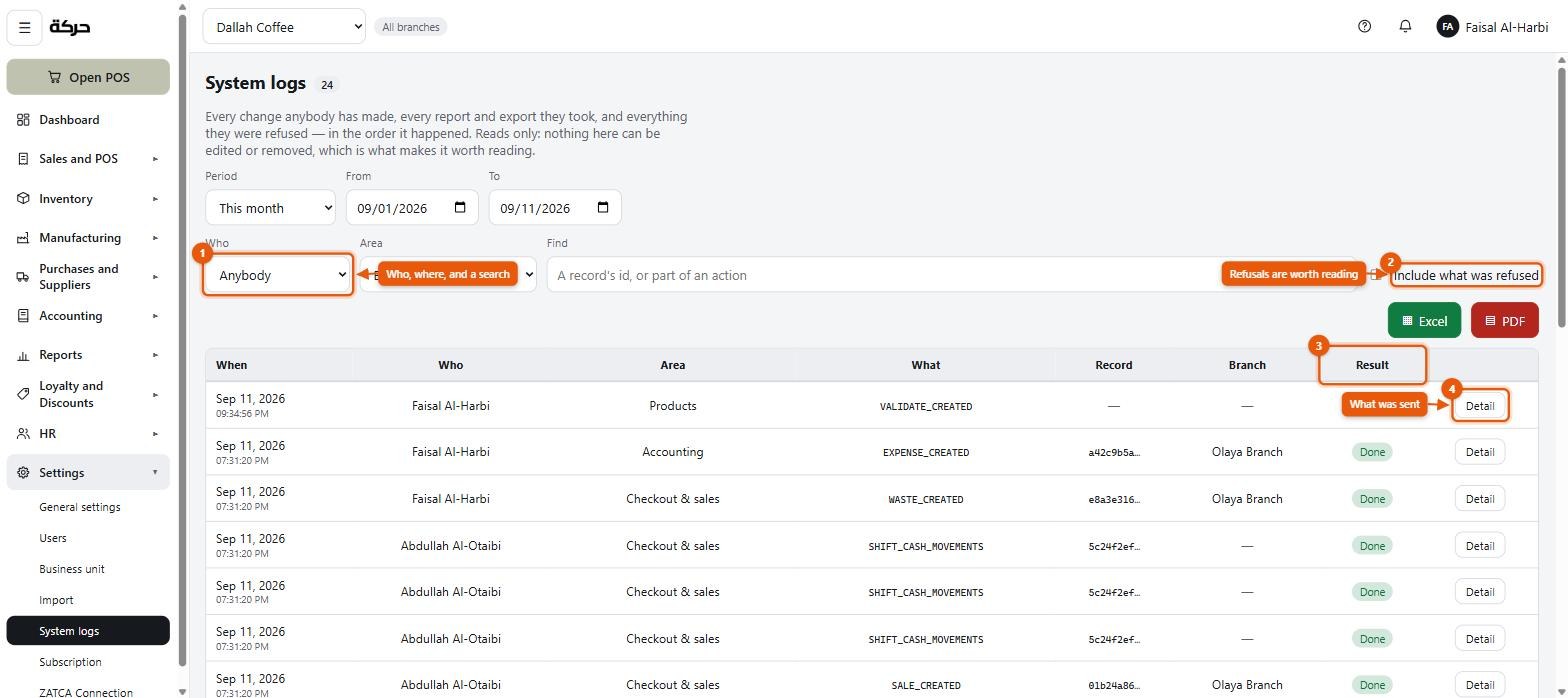
Every entry carries:
| Column | Meaning |
|---|---|
| When | |
| Who | The user, marked (left) if they have since gone |
| Area | Which part of the system |
| What | The action |
| Record | What it was done to |
| Result | Done, or Refused with the reason |
| Branch | Which branch it happened at, where it belongs to one |
And a Detail view showing what was sent.
Two things that make it useful
It records refusals as well as successes. Tick Include what was refused. Somebody repeatedly trying to do something they are not allowed to do is worth knowing about — and so is a permission that is stopping somebody from doing their job.
It survives the person. A user who has left still appears, marked as such, against the changes they made. Account removed appears where the account is gone entirely.
When to open it
- A price is wrong and nobody knows who changed it
- A product disappeared from the till
- A setting is not what you left it as
- Somebody says they could not do something and you want to know what the system actually told them
Filter by area, by person, or search a record's id or part of an action.
Worth knowing: The log is a record, not a recycle bin. It tells you what happened; it does not put it back. That is what the reversal and deactivation patterns throughout the system are for.
#If something looks wrong
A rough order of investigation, which holds for most problems:
- Is it the business unit picker? An empty screen is usually the wrong unit selected — §2
- Is it a permission? Missing screens are almost always a role — §5
- Is it the date range? Reports default to a period that may not be yours
- Is it in the stock movement history? Every quantity change is there, with what caused it — §19
- Is it in the journal? Every posting is there, with what caused it — §22
- Is it in the system log? Every change is there, with who made it
Six screens, in that order, will explain almost anything.
#And that is the whole system
You have gone from an email address to a business running on HarakahTec: a company with its papers in, staff with the right access, a catalog with real costs, tills that sell and print and balance, books that post themselves, and reports that agree with each other.
The rest is trading.