
Step 20 · Part 5 — Stock and suppliers
Manufacturing
Recipes, production orders, the daily board, and the settings that decide what happens when an ingredient is short.
Applies to: Kitchens, bakeries, roasteries — anywhere something is made from something else. Skip it if you only resell.
If your business turns ingredients into products, this section is how HarakahTec tracks it: what a batch takes, what it produces, where it is made, and where it goes.
Worth knowing: There are two different things in HarakahTec that consume ingredients, and it is worth being clear which you need.
A Recipe product (section 9) is a drink or dish made at the moment of sale. Selling a latte removes its milk and beans immediately. No production order is involved.
A production recipe (this section) is something the kitchen makes into stock, ahead of time. A tray of croissants is baked in the morning and sits on the shelf until it sells.
A café selling made-to-order drinks needs the first and may not need the second at all.
Everything here is under Manufacturing.
#Settings first
Manufacturing → Settings, because the rest does not work until these are answered. The screen says Not set up yet — these are the defaults, and nothing is stored until you save.
Where things are made
One branch. Orders can only be raised there, and the ingredients come off its shelves.
Only one, deliberately: a second is a choice someone can get wrong.
Until one is chosen the screen says Not decided yet — orders can be raised at any branch. That is a forgiving default, not an answer.
Where production can be sent
Which branches may receive finished production. Not every branch takes a tray of cakes — a store that receives raw materials may never take a finished product.
With none ticked, the question counts as unanswered and anywhere but the making place is allowed.
When an ingredient is recorded as short
This is the setting that matters most day to day.
A run sometimes needs more than the system says is there — often because a delivery has not been entered yet. Three answers:
| Choice | What happens | Suits |
|---|---|---|
| Refuse the run | Nothing is made until the ingredient is topped up or the figure corrected. | A kitchen whose stock figures are trusted |
| Ask, then allow it | Whoever completes the run confirms the stock is really there. The balance goes negative. | Most kitchens |
| Allow it without asking | The run proceeds; balances go negative. | A kitchen whose deliveries are routinely entered late |
Careful: A run that goes ahead short leaves that ingredient's balance negative. That is not a fault — it is the system telling you the paperwork is behind the reality. But negative balances that nobody clears make the stock report useless, so if you choose one of the last two, somebody has to be reconciling.
The daily check
A production board that reports at a fixed time each day.
- Runs at — the moment it reports against, so the same question asked at different times gives the same answer.
- Plans for today — an early check, for the trade about to happen.
- Plans for tomorrow — a late check, for the next day's trade.
- Count orders already raised — without this, a kitchen that raised an order this morning is told to make it again.
The screen previews what it will do: Checking at 06:00 today, the board would use Sunday's targets.
#Production recipes
Manufacturing → Production Recipes.
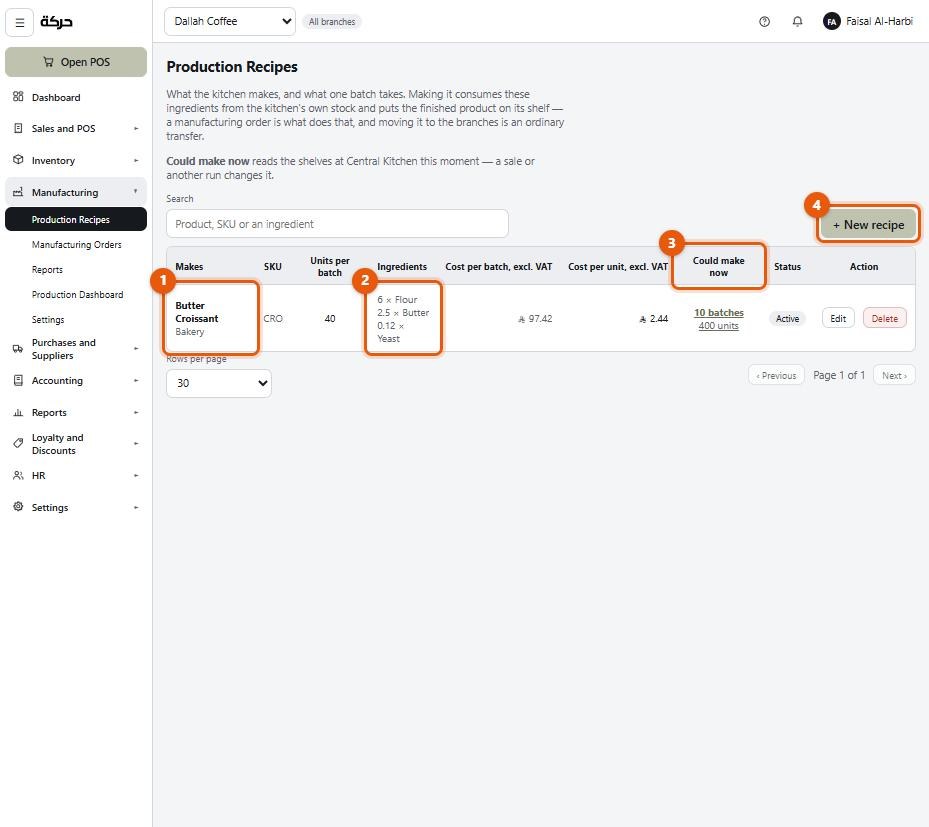
A recipe is what the kitchen makes, and what one batch takes.
Creating one
- Choose the product the recipe produces.
- One batch produces — how many. e.g. 40 croissants.
- One batch takes — the ingredients, each with a quantity.
- Note — optional. "Bake 25 minutes at 180°" is the example.
The ingredients are what one batch takes, so an order for two batches doubles them.
What the screen works out for you
Cost per batch and cost per unit, both excluding VAT, calculated from the ingredients. Nobody types a cost.
Could make now — how many batches the shelves at the making site would support this moment. The screen is honest that this moves: a sale or another run changes it.
What each ingredient covers, and which one runs out first — the panel that tells you what to order.
Careful: If an ingredient has no cost recorded, the screen says so. Blank is not zero — a cost of nothing would quietly understate every batch. Fix the ingredient rather than ignoring the warning.
Pausing and deleting
Pausing keeps the recipe but stops it being offered for new orders.
Deleting removes it. The recipe is removed. Stock already produced stays where it is — this only describes how to make more.
#Manufacturing orders
Manufacturing → Manufacturing Orders.
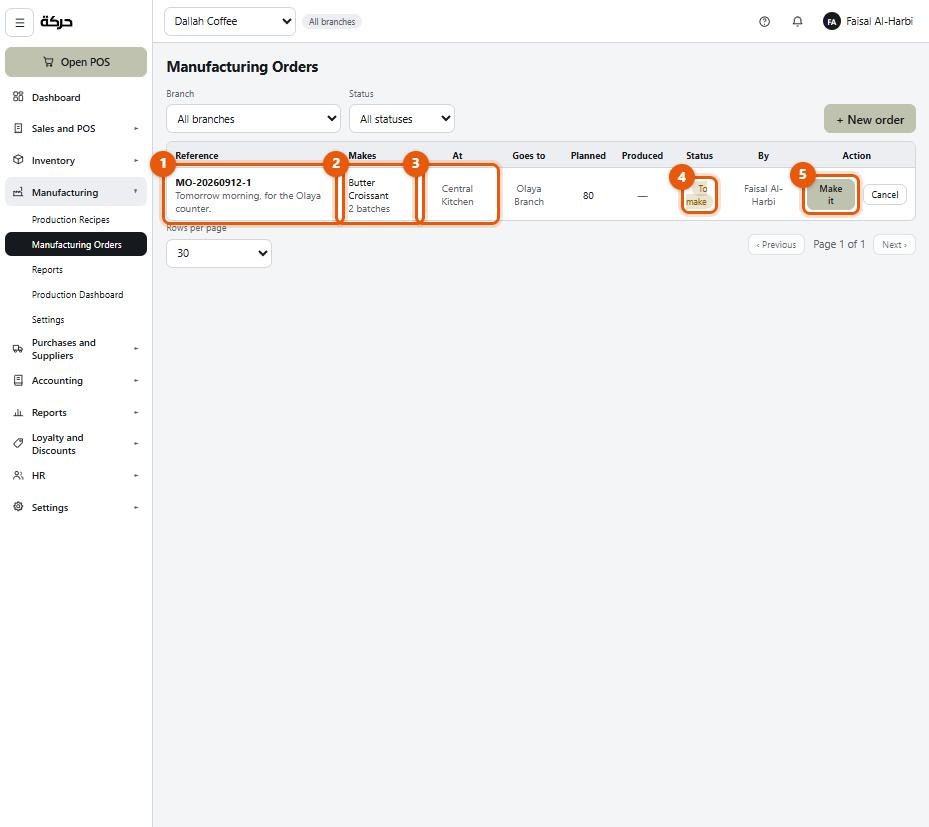
An order is one run of a recipe: what to make, where, and how much.
Raising one
| Field | Notes |
|---|---|
| Recipe | What to make |
| How much | In the product's own units, not batches. The list shows what that comes to — 80 croissants reads as 2 batches beside the recipe that makes 40. |
| Make at | The branch whose shelves the ingredients come off |
| Goes to | Where the finished product is sent |
You can add several recipes at once, but each line becomes its own order, because runs do not finish together — the cakes are out before the bread is.
The form shows what the run needs and what is on the shelf, before you commit.
Completing a run
Completing is what actually happens: ingredients are consumed, finished stock is created, and it is sent to the destination as an ordinary transfer.
This needs permission — Completing an order consumes ingredients and creates stock.
When completing, you enter what was Actually produced, which may not be what was planned. A batch that burnt produces less; the system records what really came out.
A run that made nothing
If a batch failed completely, complete it with Actually produced at zero. The ingredients still come off the shelf — they were used — but no finished stock is created and nothing is sent anywhere.
What those ingredients were worth is written off as waste: the books post it to the Waste cost account, with the order's reference and the note nothing produced; ingredients written off. Without that, the inventory account would go on carrying the value of flour and butter that no longer exists.
Manufacturing reports count these runs separately — produced nothing — so a kitchen with a run of failed batches is visible.
Cancelling
Nothing is made and no stock changes. The order stays on the list as a record that it was raised and abandoned.
#The production dashboard
Manufacturing → Production Dashboard is the board the daily check feeds: what should be made today, against targets, taking into account what has already been raised.
It is the screen a kitchen manager looks at first thing in the morning.
#Manufacturing reports
Manufacturing → Reports shows what was produced over a period, what it cost, and the cost per unit — so you can see the real cost of what you make moving as ingredient prices move.
#What to do next
Section 21 covers customers, loyalty points and discount rules.