
Step 23 · Part 6 — Customers and money
Cash management
What every open drawer should hold right now, the three reasons money leaves one, and how every cash movement becomes a document.
Applies to: Everyone taking cash. The Review tab is the one that keeps your profit and loss honest.
Cash is the part of a business that goes wrong quietly. HarakahTec's answer is to record every movement at the moment it happens, and then make somebody account for it afterwards.
Go to Sales and POS → Cash Management. Four tabs.
#Cash position
What every open drawer should hold right now.
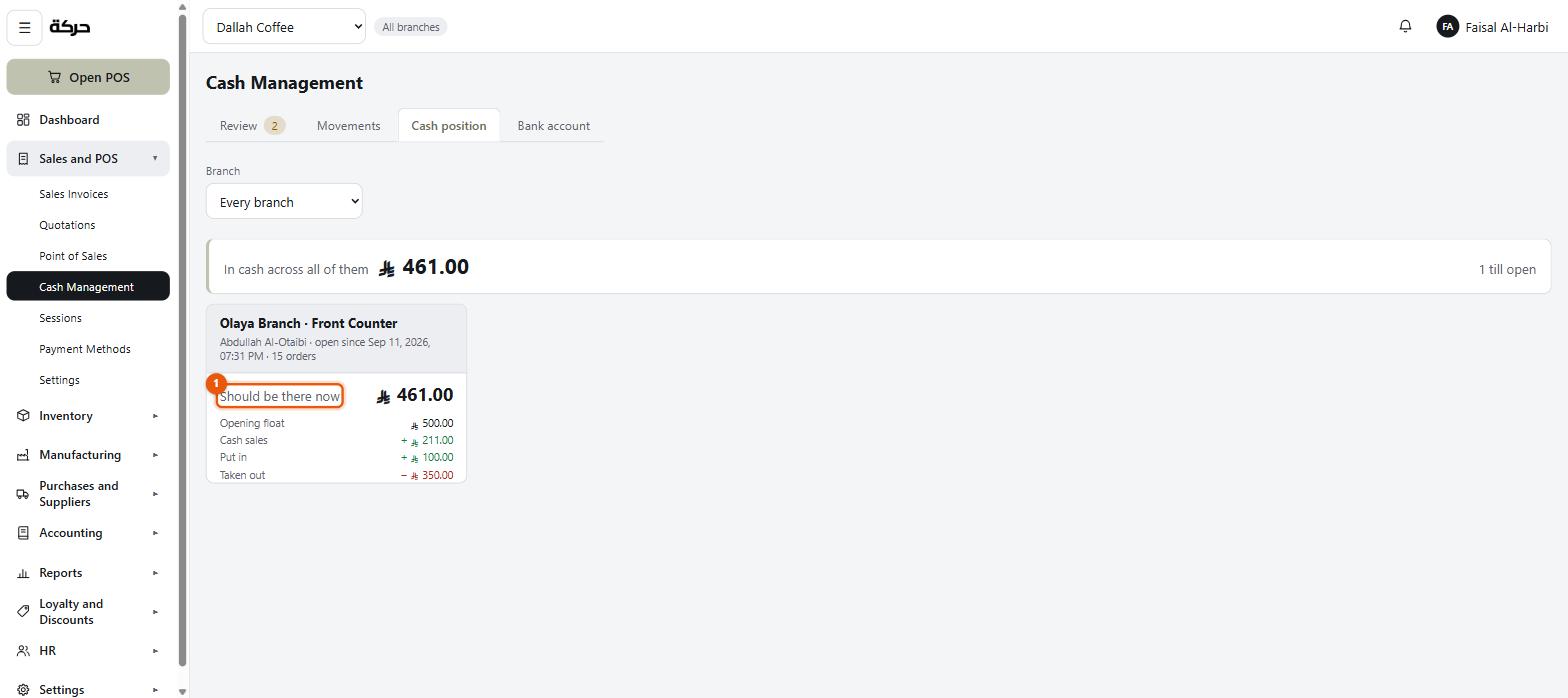
For each open till:
Opening float + Cash sales + Put in − Taken out = Should be there now
And a total across all of them — In cash across all of them, with how many tills are open. Each drawer names the cashier on it, when it opened, and how many orders it has taken.
Worth knowing: The Review tab carries a badge with how many cash movements are still waiting to be accounted for. That number is the work queue, and it is visible from every other tab.
This is a reading screen. Money is moved at the till, by the person standing in front of it — not from a desk. There are no buttons here to move cash, deliberately.
Worth knowing: If a till shows No till is open, nobody has started a shift on it. The position screen only knows about drawers that are currently open.
#Movements
Every cash movement, in or out, across the business unit.
Money in
The cashier writes a note saying what it is — change brought over, a correction. There is no reason to choose at the till. Where the money actually came from is decided in the office: every cash-in waits in the Review tab until somebody says whether it came from the bank, the safe, the owner, or is other income.
Money out
Three reasons, and the reason is required:
| Reason | Example |
|---|---|
| Paid a supplier | Cash to the baker at the door |
| Owner took cash | The owner taking money out |
| Paid a wage | An advance to staff |
Careful: There is no "something else" for a cash-out. The till offers the three reasons and nothing more. That is deliberate: a drawer that is SAR 300 lighter with no reason on it is the single most common way cash goes missing, and "other" is how it hides. Money back to a customer is not a cash-out either — it is a refund or a void of the sale at the till, which takes it out of the drawer on its own.
A supplier payment also asks who was paid. Nothing waits for a manager: every movement, in or out, is approved the moment the cashier records it, and counts in what the drawer should hold straight away. The check comes afterwards, in the Review tab.
What happens in the books
Every movement posts the moment it happens, because the money has already moved.
A cash-out debits cash in transit and credits the drawer. The money has left the till but has not yet been accounted for — it is in somebody's pocket, on its way to becoming a supplier payment or an expense.
A cash-in is the mirror image: it debits the drawer and credits cash in transit, and waits there until somebody says where the money came from.
That is what the next tab is for.
#Review — the tab that matters
Cash that has moved through a drawer and is not yet anywhere.
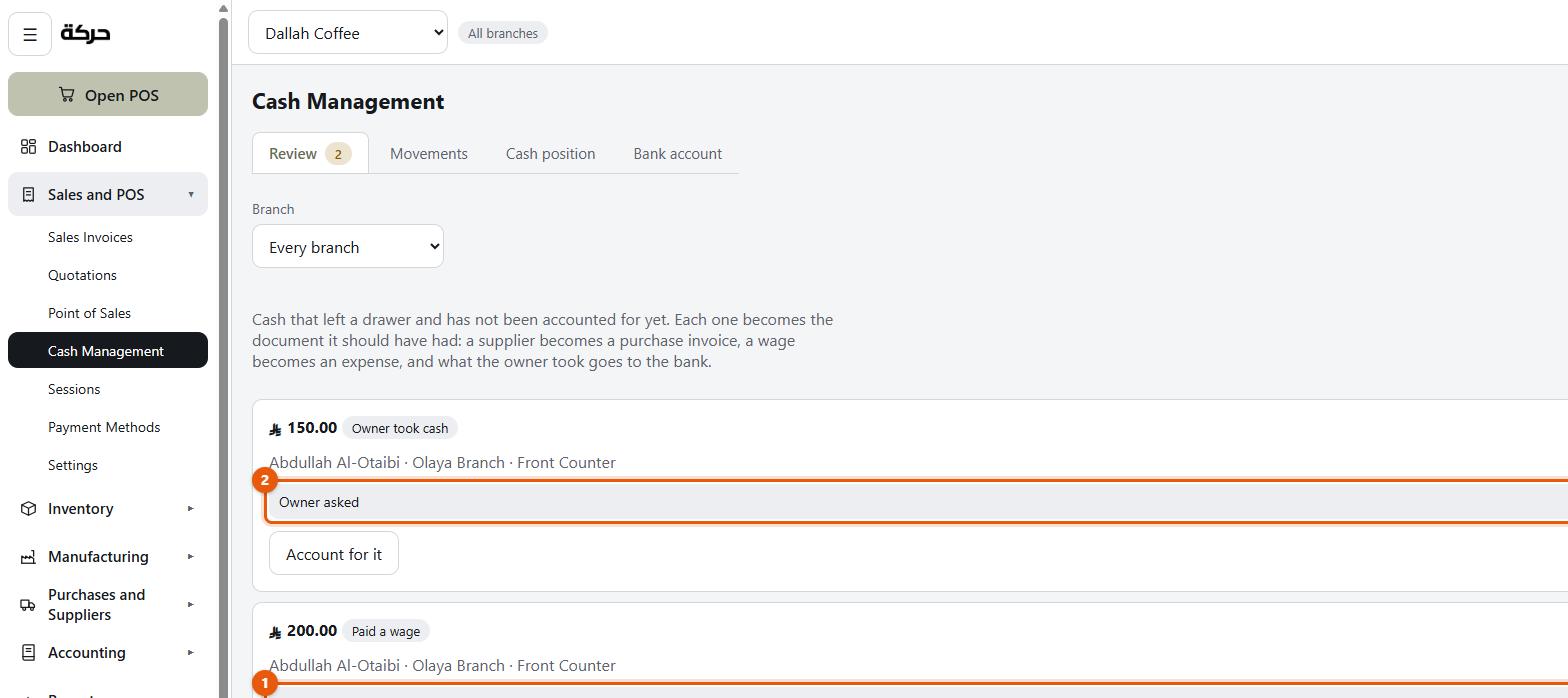
The screen states the job in one line: Cash that left a drawer and has not been accounted for yet. Each one becomes the document it should have had: a supplier becomes a purchase invoice, a wage becomes an expense, and what the owner took goes to the bank.
Each row shows the amount, what it was filed as — one of the three reasons, or Money put in — who handled it, at which branch and till, the note they wrote, and an Account for it button. Your job is to say what it actually was:
- Paid a supplier → choose the Supplier, enter the Supplier invoice number, the Invoice date and the lines. The cash-out becomes a purchase invoice, paid from the drawer's cash.
- Paid a wage → choose the Expense account and who it was Paid to. It becomes an expense, paid from the till.
- Owner took cash → it goes to the company bank account, and nothing else is asked. It then appears on the Bank account tab.
- Money put in → choose Where it came from, which is required: The bank, The safe, The owner or Other income. From the bank or the safe moves it out of there; from the owner is capital; only money nothing else explains is income.
- Money back to a customer → only on older cash-outs, recorded before this stopped being a reason. It is matched to the invoice it refunded, found by invoice number.
Press Record it and the movement clears: cash in transit is settled, and the real cost — or the real source — lands where it belongs.
Accounting for movements needs the Accounting: Approve permission, and nobody can account for a movement they made themselves — the review is meant to be a second pair of eyes.
Careful: A balance sitting in cash in transit is not an account to reconcile — it is this queue. When the review tab is empty, that account reads zero. If it does not, something left a drawer and nobody ever said what it was.
The screen shows the arithmetic as you work: Lines SAR 340.00 against SAR 350.00 out of the drawer — so you can see when what you are entering does not match what left.
Why this exists
Because the alternative is worse. If a cashier had to categorise the money as it moved — supplier? expense? wage? the bank or the safe? — they would guess, and the profit and loss would be wrong in a way nobody notices for a week.
So the till records only that money moved, and the office, with the receipt in hand, says what it was.
#Bank account
What has been banked: deposits taken out of the business's cash and put into the bank, with who took them and when.
Worth knowing: Each row here is cash a cashier took out as Owner took cash that a review sent to the bank. Change brought from the safe into a drawer is recorded at the till as money in, and reviewed as The safe. There is no cash-out reason for putting drawer cash back into a safe — the three reasons are the only ones.
#A daily routine
For a shop taking cash:
- Morning — the cashier opens the shift and counts the float.
- During the day — any cash in or out is recorded at the till as it happens: a cash-out with its reason, a cash-in with a note.
- Evening — the cashier closes the shift and counts the drawer.
- Next morning, in the office — work the Review queue to empty. Every cash-out from yesterday gets its document, and every cash-in gets its source.
Section 26 covers steps 1 to 3 from the cashier's side. Section 29 puts the whole routine together.
#What to do next
Section 24 covers HR — the people on your payroll, as opposed to the people with logins.