
Step 22 · Part 6 — Customers and money
Day-to-day accounting
Expenses, fixed assets, what customers owe, journal entries, and the two reports that tell you whether the books are right.
Applies to: Everyone. Most of it runs itself; this is the part that does not.
Section 6 opened the books. This is what you actually do in them.
Most of HarakahTec's accounting happens without you: a sale posts, a purchase posts, a wage posts. What is left is the handful of things nobody else can know about — money spent, things bought that last for years, and money customers still owe.
#Expenses
Accounting → Expenses.
An expense is money spent that is not stock and not a wage. Rent, electricity, a plumber, a delivery bike's petrol.
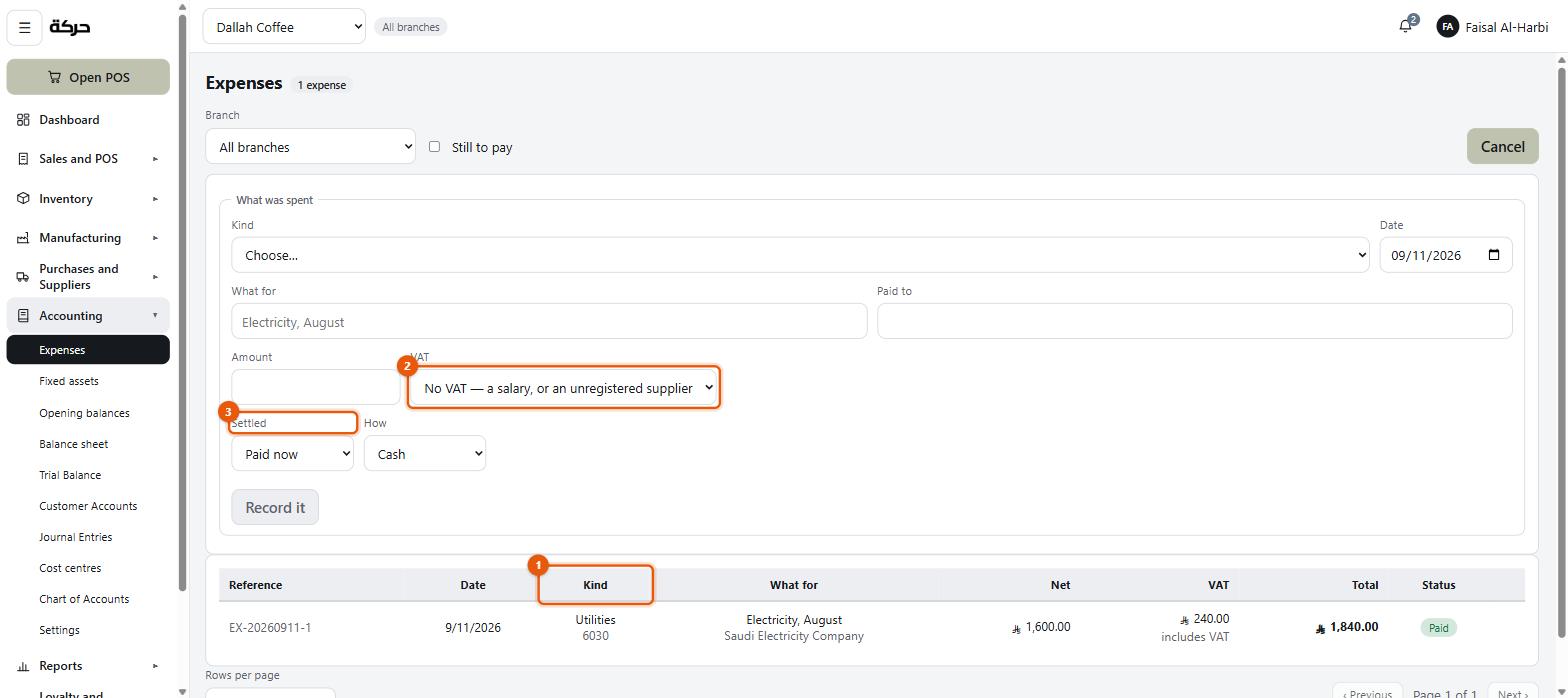
Recording one
The block is headed What was spent.
| Field | Notes |
|---|---|
| Kind | The expense account, chosen from your chart by code and name — 6030 Utilities. |
| Date | |
| Where | Required, and nothing is chosen for you: one of the branches of the business unit you are working in, or The whole business for a cost that belongs to no one shop — rent on the office, an accountant's fee. |
| Cost centre | Optional. Left at As where it belongs says, the expense follows the cost centre of the place you chose (section 6). Change it only when this one cost belongs somewhere else. |
| What for | The description. "Electricity, August" is the placeholder. |
| Paid to | Who got the money. |
| Amount | |
| VAT | Three choices — see below. |
| Settled | Paid now or Pay later. |
| How | When paid now: Cash, Bank transfer or Card. |
| Due | When it is to be paid later: the date it falls due. Required. |
| Note | Optional. |
| Bill | Optional. Attach the bill — a photo or PDF of it. |
Worth knowing: Kind is the account and What for is the words. People reverse these, and the result is a chart of accounts with an entry called "Electricity, August" in it. The account is the group the cost belongs to; the description is what this particular one was.
The VAT treatment matters
Three choices, and they are not the same:
- The amount includes VAT — the figure you typed is the total, tax inside it.
- VAT is added to it — tax is added to the figure you typed.
- No VAT — a salary, or an unregistered supplier — the screen names the two cases you actually meet.
Get this right and the VAT you paid appears on your VAT return as recoverable input tax. Get it wrong and you either over-claim or leave money with the tax authority.
Paid now or later
Paid now posts the payment at the same time. Pay later records the expense and leaves it as something you owe, with the date it is Due. On the list it carries a To pay chip, which turns to Overdue once the due date has passed, and a Pay button settles it. Tick Still to pay above the list to see only those.
The bill
Attach the supplier's bill to the expense — a photo or a PDF. It is kept with the expense: open the expense from the list to view it, open it at full size, print it or download it. A bill can be attached or replaced later, too.
Correcting or deleting an expense
Each row can be opened, edited and — within limits — deleted.
- Editing the amount, VAT, kind, date or payment reverses its entry in the books and posts it again as it now reads. The date can move within this month only.
- Once an expense was paid after it was entered, or is dated in a month already past, its amount, VAT, kind, date and payment are locked. The wording, the note and the bill can still be corrected; if the figures are wrong, cancel it and record it again.
- Deleting is only for an expense entered by mistake, and only this month's expenses can be deleted. Its entry in the books is reversed and it leaves the list; the record is kept for the audit trail.
#Fixed assets
Accounting → Fixed assets.
A fixed asset is something you bought that lasts: an espresso machine, a fridge, a fit-out, a vehicle. It is not an expense in the month you bought it — it is spread over the years you use it.
Registering one
Press Register an asset. The Reference is given automatically.
| Field | Notes |
|---|---|
| Name, and Name in Arabic | What it is. |
| Category | Your own grouping — Kitchen equipment, vehicles… |
| Branch | Where it is used, or The whole business. |
| Acquired | The date. |
| Cost | What you paid, net of any VAT you can reclaim. |
| Worth at the end | The salvage value — what it will still be worth. It is never depreciated below this. |
| Life (months) | How long it will be useful for. |
| Paid from | Under How it was paid for: Bank, Cash, or Still owed. If you already booked it as an expense, correct that first — otherwise the cost lands in the books twice. |
The screen then shows Each month — the depreciation charge — and, once it has been running, Written off and Worth now.
Running a month of depreciation
Press Run a month and choose the month. The system charges every asset still depreciating and tells you what it did: 4 asset(s) charged, SAR 1,240.00 in all.
If nothing was due, it says so rather than posting a zero. Running the same month twice charges it once, so it is safe to run again if you are not sure.
Careful: Depreciation does not run by itself. It is a deliberate monthly action, which means somebody has to remember. Put it on the same day you do your VAT check.
Disposal
When an asset is sold or scrapped, Dispose of it. The system works out whether you made a gain or a loss against its written-down value and posts that.
Editing or deleting an asset
An asset can be edited from its row. Changing the cost, date, how it was paid or the branch reverses its entry in the books and posts it again. What can still change depends on how far it has gone:
- Registered in an earlier month — its cost, date and how it was paid are fixed; its life, end value, branch and wording can still be corrected.
- Depreciation has been charged — what it is worth can no longer change. Moving it to another branch carries its cost and what has been written off with it.
- Disposed of — only its name, category and note can change.
Delete is only for an asset registered by mistake, and only until a month of depreciation has been charged on it; after that, dispose of it instead. Its entries are reversed and the record is kept for the audit trail.
#Customer accounts
Accounting → Customer Accounts is the other side of the tabs from section 21: who owes you, and getting it in.
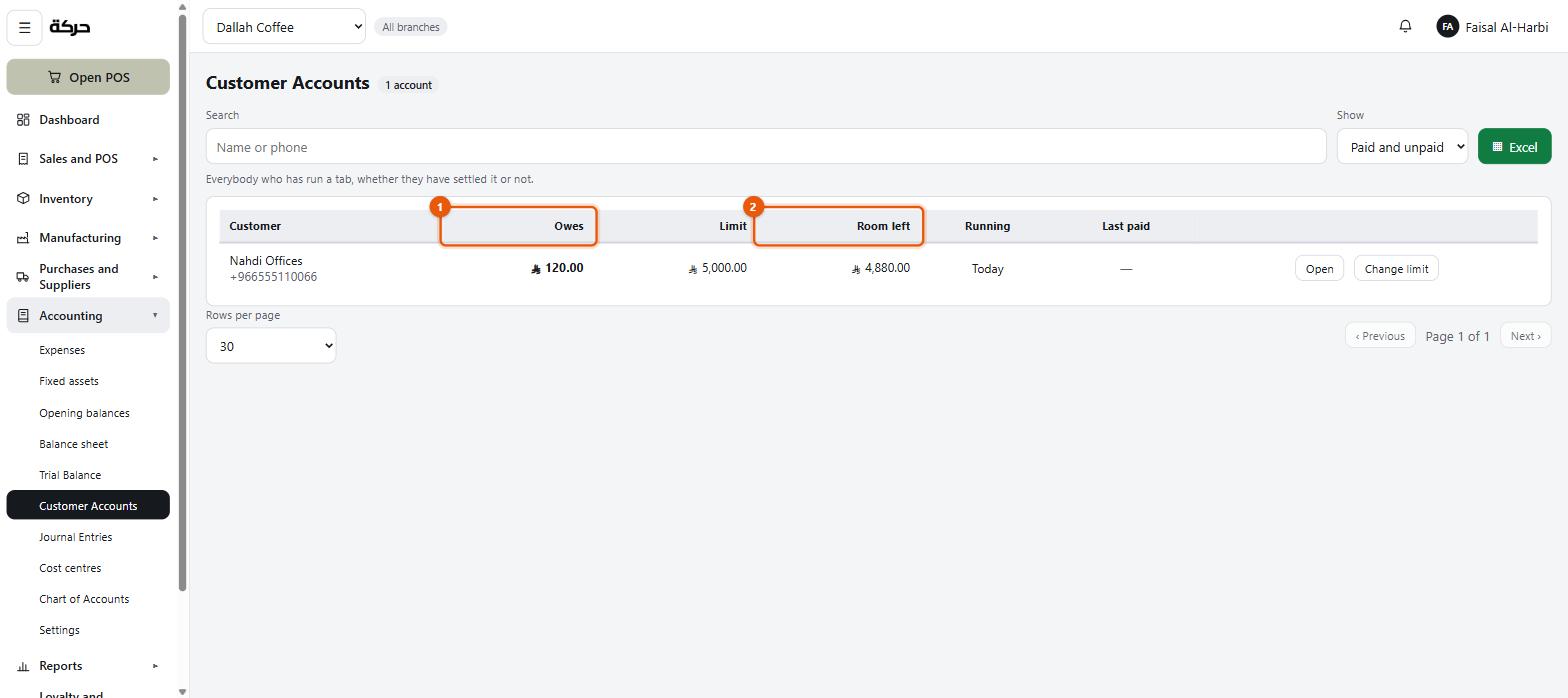
The list shows per customer: Owing now, Limit, Room left, Running, Last paid, and whether they are Square.
Taking a payment
Press Take a payment and record what the customer paid and how — Cash, Card or Bank transfer.
You do not choose which sales it settles. The payment is allocated automatically, oldest first: somebody handing over money is paying off what they owe, not choosing which coffee it settles. The statement then shows which sales are paid and which are still owed.
Writing one off
Sometimes money is not coming. In the Take a payment window, tick Give up on it instead and press Write it off — the balance goes to bad debts, where the loss can be seen, rather than being recorded as money received.
Careful: Writing off is a real accounting decision with a tax consequence. It is not the same as deciding to stop chasing somebody. Talk to your accountant before using it.
Statements
Each customer has a statement: what they bought, what they paid, and the running balance. This is what you send when somebody queries their account.
#Journal entries
Accounting → Journal Entries is the ledger itself — every posting the system has made, and any you make by hand.
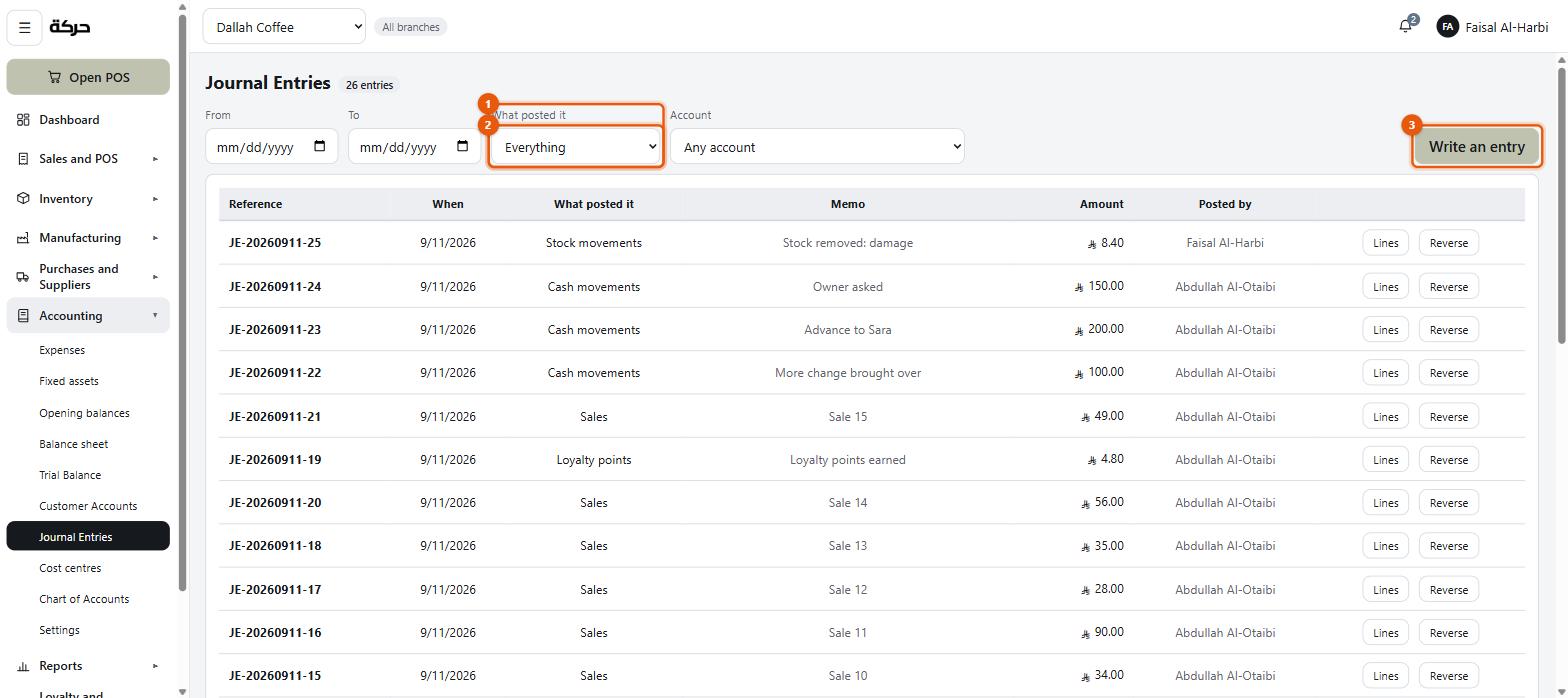
Reading it
Each entry has a date, a memo saying what it was, who posted it, and a set of lines with debits and credits.
The filters are by What posted it — what caused the entry. The list covers everything the ledger can carry: sales, cancelled sales, refunds, purchase invoices, purchase refunds, supplier payments, customer payments, expenses, cash movements, shift closes, stock movements, card settlements, opening balances, loyalty points, reversals, and Written by hand.
That last one is the useful filter: it shows everything a person entered rather than the system.
You can also filter by account, which shows entries with a line against it, whole — an entry only half shown does not balance, and a half-balanced entry teaches you nothing.
Posting one by hand
Press the button, date it, write a memo, and add lines until debits equal credits. The form will not let you post an entry that does not balance.
Use this for things the system cannot know about: a correction your accountant asks for, an accrual, an owner's injection of capital.
Entries are never edited
This is the rule that makes the books trustworthy:
A posted entry is never edited or deleted: the correction is its mirror, which is what an audit trail is.
So instead of an edit button there is Reverse it. Reversing writes the opposite entry rather than removing the original, and both stay visible. The original is marked reversed.
When you reverse, you are asked why. Write something useful — "Posted against the wrong account" is the screen's own example.
#Trial balance and balance sheet
Two reports that answer are the books right?
Accounting → Trial Balance lists every account with its debit or credit balance, and the two totals. They must be equal. If they are not, something is wrong at a level that needs investigating rather than interpreting.
It can be narrowed to a branch or to one Cost centre (section 6). Read that way it shows one part of the business, so it need not balance on its own — the screen says so.
Accounting → Balance sheet is the same information arranged as a statement: what the business holds, what it owes, and what is left for the owner.
Worth knowing: Check the trial balance after your first week of trading. It is the fastest way to find out that something in the setup is not posting the way you expected — while there is still very little to unpick.
#What to do next
Section 23 covers cash management: what should be in every drawer right now, and turning a cash-out into its document.