
Step 08 · Part 3 — The catalog
Categories and subcategories
How products are grouped for the back office, for reporting, and for deciding which branches even see them.
Applies to: Everyone. Ten categories is usually plenty; fifty is a sign something has gone wrong.
A category groups products. It is what the stock report sums by, what the sales report breaks down by, and what decides whether a product appears at a warehouse at all.
Worth knowing: There are two kinds of grouping in HarakahTec, and they are not the same thing. Categories (this section) are the back office's filing system. POS categories (section 15) are the coloured tabs on the cashier's grid. They are separate because the way a stockroom thinks about products is not the way a cashier does — a barista does not need Cleaning supplies as a tab, and an accountant does not need Hot / Cold / Food.
Go to Inventory → Categories.
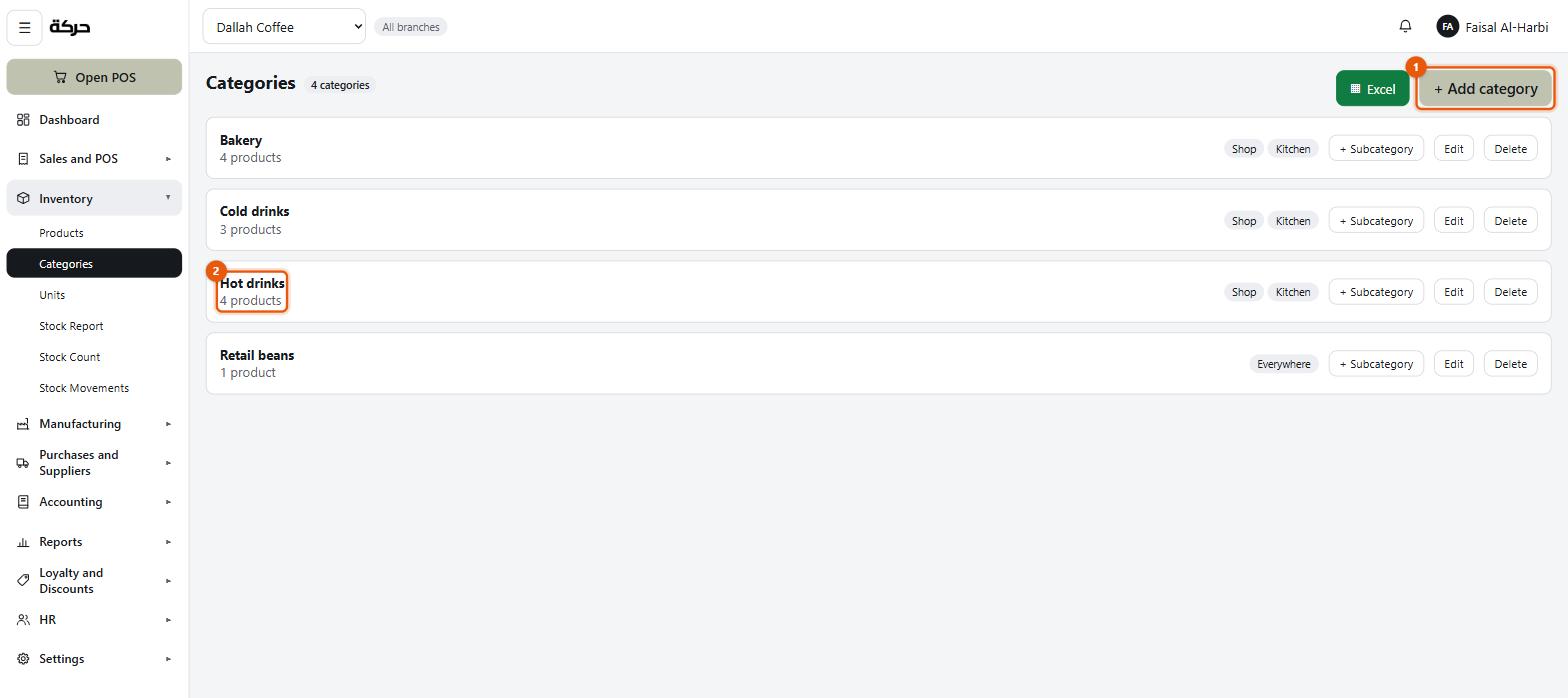
The screen has since changed: categories no longer carry a colour.
#Adding a category
Press Add category.
| Field | What it does |
|---|---|
| Name (English) | What the group is called. |
| Name (Arabic) | The same in Arabic. |
| Available at | Which branch types this category appears at. |
Available at — the field worth thinking about
This is a list of the three branch types from section 4 — Shop, Warehouse and Kitchen, which is what the chips on a branch say. Tick the ones where this category belongs.
Some worked examples:
- Hot drinks — Shop only. A warehouse does not serve coffee.
- Raw ingredients — Warehouse and Kitchen. They are held and used, never sold over a counter.
- Cleaning supplies — Warehouse only.
- Packaged beans — all three. Held in the warehouse, made in the roastery, sold in the shop.
The screen tells you what you have chosen in plain words: Everywhere, or the named types, or Nowhere.
Careful: With nothing selected the category appears on no branch at all. The screen warns you — It appears on no branch at all — and its products stay in the catalog but are invisible where people work. This is almost never what anybody means.
#Subcategories
A category can hold subcategories, which is the finer grouping. Hot drinks might hold Espresso-based, Filter and Saudi coffee.
Press + Subcategory on the category's row.
A subcategory can only be available where its parent is. The system enforces this: if you narrow a category to Shop, any subcategory that was also available at the warehouse is narrowed with it.
Products can be filed directly in a category or in one of its subcategories. The screen shows both counts, so a category reads as 8 products · 3 filed directly here.
#Colours
Inventory categories have no colour. Nobody navigates the back office's filing by colour, so there is nothing to set here.
Colour belongs to the till's POS categories, where it tints the tile a cashier taps. A POS subcategory can tick Use its category's colour to take its parent POS category's colour rather than pick its own. That is covered in section 15.
#Deleting a category
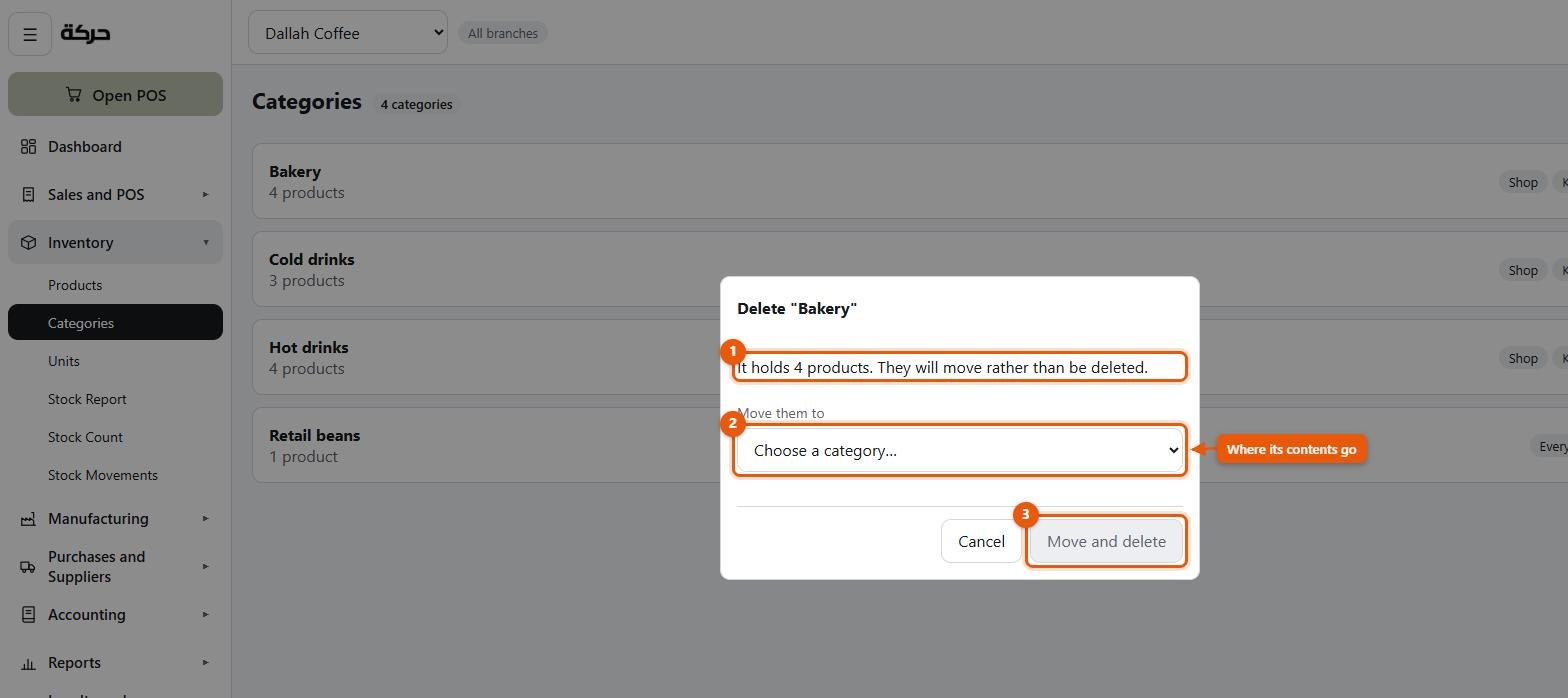
A category holding products cannot simply vanish — the products would have nowhere to be filed. So deleting one asks where its contents should go.
The dialog tells you exactly what it holds:
It holds 8 products and 3 subcategories. They will move rather than be deleted.
Choose a category in Move them to and press Move and delete.
Subcategories move across intact, so each product keeps its finer grouping — you are moving the branch of the tree, not flattening it.
If the category is empty, the screen says This category is empty, so nothing needs moving and deletes it without asking.
#Do products need a category?
No. A product can be saved without one.
But the screen tells you what you give up: the POS grid has no groups to show if nothing is categorised, and the reports that break down by category will have an unhelpful "uncategorised" bucket carrying everything.
Categorise as you go. It is much harder to do to four hundred products later than to four now.
#How many categories to make
Fewer than you think. A category is useful when you would genuinely ask a question about that group — how much did we sell in bakery this month? If you would never ask it, the group is filing for its own sake.
A coffee shop usually needs about five: Hot drinks, Cold drinks, Bakery, Retail beans, Supplies. Everything finer goes in subcategories.
#What to do next
Section 9 is the big one: the products themselves.