
Step 07 · Part 3 — The catalog
Units of measure
What you buy in and what you sell in, and how the system converts between them without anybody typing a ratio.
Applies to: Everyone, briefly. Most businesses use the built-in units and never come back.
A product is often bought in one unit and sold in another. You buy coffee beans by the kilogram and sell them by the 250g bag. You buy water by the case and sell it by the bottle.
HarakahTec handles that with units of measure, and it does the arithmetic for you. This is a short section — most businesses need nothing more than the units that are already there — but it has to come before products, because a product cannot point at a unit that does not exist.
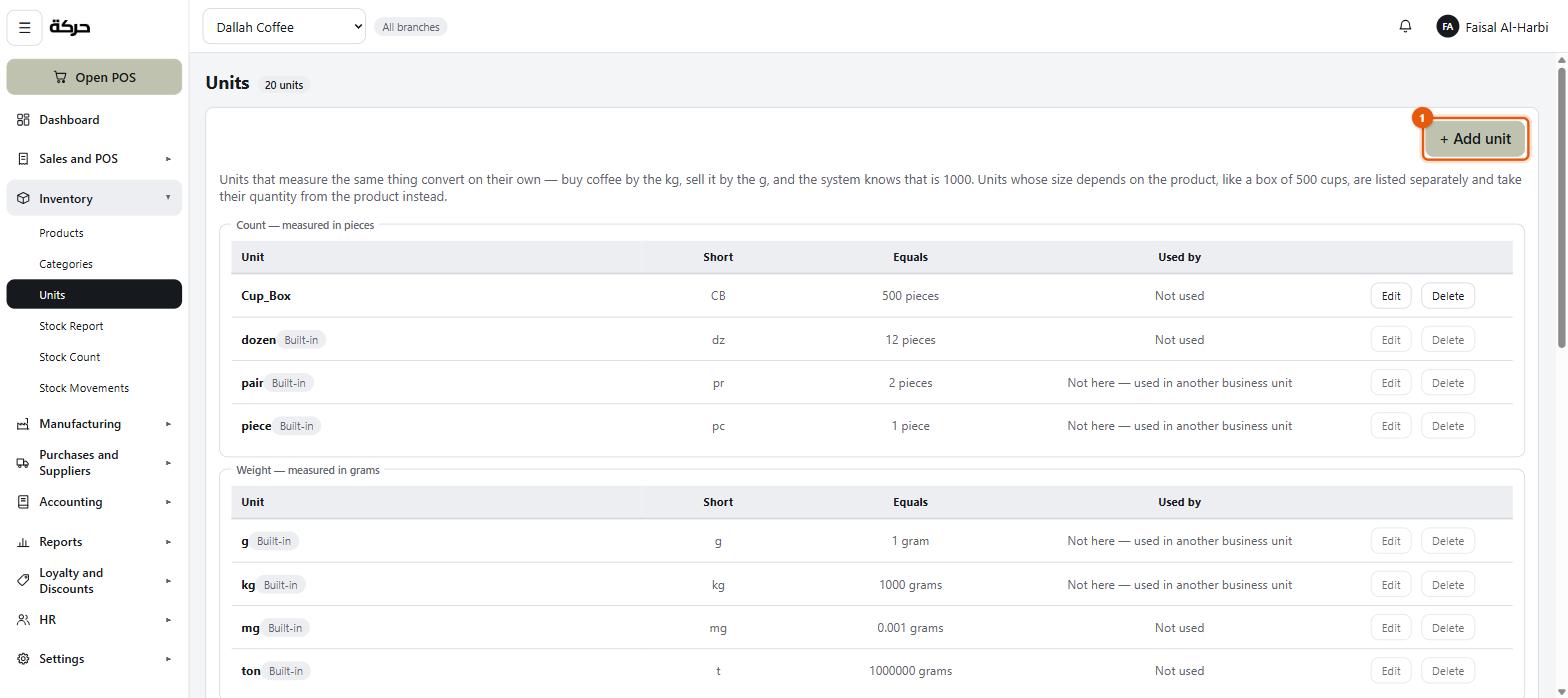
Go to Inventory → Units.
#The four dimensions
Every unit measures one of four things:
| Dimension | Base unit | Examples |
|---|---|---|
| Count | piece | piece, dozen, box, case |
| Weight | gram | gram, kilogram |
| Volume | millilitre | millilitre, litre |
| Length | millimetre | millimetre, metre |
Each unit records how many of its dimension's base unit one of them is. A kilogram is 1,000 grams. A litre is 1,000 millilitres. A dozen is 12 pieces.
That one number is what makes conversion automatic: the ratio between two units' base figures is the conversion, so nobody types 1,000 by hand and nobody mistypes it.
Worth knowing: You can only convert within a dimension. Kilograms to grams, yes. Kilograms to litres, no — the system refuses, because it does not know how dense your product is. If you genuinely buy by weight and sell by volume, the conversion is a property of that product and belongs in a recipe (section 20).
#Packaging units
Some units have no fixed size at all. A box holds 500 cups or 12 bottles depending on what is in it. A case, likewise.
These are marked as packaging, and the screen labels them Packaging — size comes from the product. When you use one on a product, you say how many sales units are in it for that product, and the answer is remembered per product.
A dozen is not packaging, because a dozen is always twelve.
#The built-in units
Nineteen units arrive with the system, covering the four dimensions. They are shared by every company, and they are marked Built-in.
You cannot rename or delete a built-in unit — it is shared by every company, so its edit and delete buttons are greyed out, with the note Built-in units stay put. If you need a different name or size, add a unit of your own.
Worth knowing: Built-in units are shared, but your units are yours. A unit you add appears only in your company. This was not always true, and the screen's note about it exists because a unit one shop added used to appear in everybody's list.
#Adding a unit
Press Add unit.
| Field | Notes |
|---|---|
| Name | Required. The full name — "bucket", "jerrycan", "bundle". |
| Short form | The abbreviation that fits on a receipt line — "bkt", "jc". |
| Measures | Which of the four dimensions it measures: Count, Weight, Volume or Length. |
| One {unit} equals | The label carries the name you typed — One bucket equals — and the dimension's base unit sits beside the box. A 20-litre bucket is 20,000 (millilitres). |
If the unit's size varies by product, tick Its size depends on the product instead of giving a size. Each product then says how many it holds.
Once products measure in one of your units, its name and short form can still be changed, but what it measures and its size cannot — that would silently rewrite their quantities.
#What "Used by" tells you
Each row shows how many products use the unit, split into purchase and sales uses. This is what tells you whether a unit is safe to delete.
A unit in use cannot be deleted — the products pointing at it would have nothing to point at. Take it off those products first.
You will also see Not here — used in another business unit, which means the unit is in use somewhere you are not currently looking. Switch business units to find it.
#How this shows up on a product
On the product form (section 9) there is a Units block with two fields:
- Bought in — the unit on a supplier's invoice
- Sold in — the unit on a customer's receipt
If both are in the same dimension, the conversion is worked out for you. If one of them is a packaging unit, the form asks a third question: How many {sales} are in one {purchase}?
A worked example, for a bag of coffee:
- Bought in: kilogram
- Sold in: gram
- Conversion: automatic — 1 kg is 1,000 g
And for bottled water:
- Bought in: case (a packaging unit)
- Sold in: piece
- Conversion: you type 24, because that is how many are in your case
Careful: Get this right before you receive stock. A purchase invoice that receives 10 cases adds 240 bottles to the shelf if the conversion says 24. If the conversion is wrong, so is your stock, and correcting it afterwards means a stock count.
#What to do next
Section 8 sets up categories, which is how products are grouped for the back office and for reporting.