
Step 25 · Part 7 — Selling, reporting, going live
Quotations
Offer a price before the sale happens, track whether it was accepted, and turn it into an invoice when it is.
Applies to: Anybody who quotes — catering, wholesale, events. Skip it if every sale is over a counter.
A quotation is a price you offer before anything is sold. It commits no stock, posts nothing to the books, and expires on a date you choose.
If your business only ever sells over a counter, you will never need this screen. If somebody ever asks "how much for 40 boxes for an office event?", this is where the answer lives.
Go to Sales and POS → Quotations.
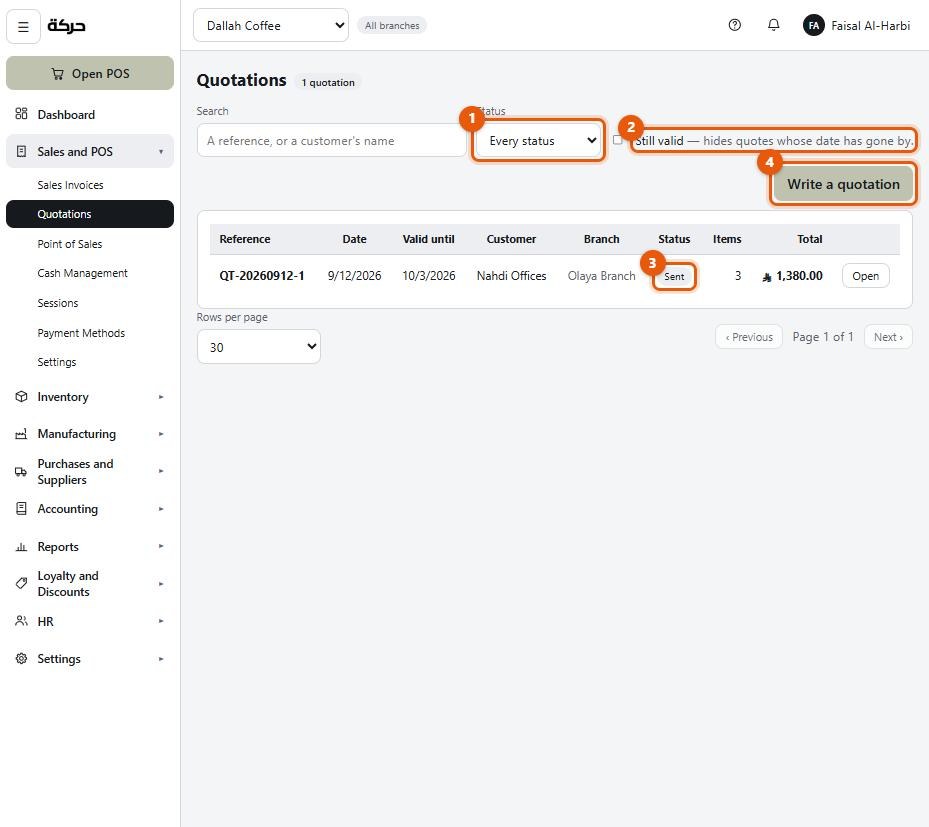
#Writing one
Press Write a quotation.
| Field | Notes |
|---|---|
| Customer | Optional. Pick one from your customer list, or leave it at Nobody in particular. This form cannot create a customer — add a new one under Loyalty and Discounts → Customers first |
| Valid until | The date the offer expires |
| Lines | Product, quantity, price |
Prices default to the product's own but can be changed on the quote — which is the point of quoting.
#The five statuses
| Status | Meaning |
|---|---|
| Draft | Being written. Not sent to anybody. |
| Sent | Given to the customer. |
| Accepted | They said yes. |
| Declined | They said no. |
| Cancelled | Withdrawn. |
Moving a quote to Sent records that it went out. The screen confirms: QUO-0042 sent.
A quote whose Valid until date has passed shows as lapsed, and the list has a Still valid filter that hides quotes whose date has gone by.
#Printing one
A quotation prints as an A4 document, laid out like your invoices — same layout, same logo, same seller details — so what a customer receives looks like it came from the same business as the invoice that follows.
#Tying a quote to the sale it became
Mark the quote Accepted, and the screen tells you what happens next: Accepted. The sale is rung up at a till — say which invoice it was, so this is not left looking unfinished.
So the sale itself is an ordinary sale. Somebody rings it up at the till in the usual way. Then you come back here, type the invoice's reference into Sold as invoice and press Record the sale, and the quote is linked to it. The quote then shows Sold as invoice {reference}, on its date, for its total.
The reference is the reference printed on the invoice, rung up at {branch} — so whoever served the customer only has to keep the receipt.
If you link the wrong one, Not that invoice unlinks it.
Careful: The lines do not carry across. Quoting does not pre-fill a sale, and nothing reconciles the quoted price against what was actually charged — that check is yours. Where a quote has many lines or a negotiated price, give the cashier the printed quotation to ring up from.
#Finding one later
The list searches by a reference, or a customer's name, and filters by status and validity.
Worth knowing: A quotation that was never accepted is still worth keeping. Six months later, "what did we quote them last time?" is a question with a real answer.
#What quotations do not do
Three things, so there is no surprise:
- No stock is reserved. Quoting 40 boxes does not hold 40 boxes.
- Nothing posts to the books. A quote is not revenue, and it is not a receivable.
- No tax point is created. The VAT arises when the sale happens, not when the offer is made.
#What to do next
Section 26 is the till itself — the whole of a cashier's day, from signing in to closing the drawer.