
Step 18 · Part 5 — Stock and suppliers
Suppliers and buying
Suppliers, purchase orders, purchase invoices, returns to a supplier, and paying them. This is how stock — and its cost — enters the business.
Applies to: Everyone who buys anything. That is everyone.
A purchase invoice is how bought stock enters the business, and where its cost comes from. That second half is the part people underestimate: if stock arrives without a document, the system knows how much you have but not what it cost, and every profit figure downstream is guesswork.
Everything here is under Purchases and Suppliers.
#Suppliers
A supplier is who a purchase invoice is from. Adding them is what lets you raise one.
Go to Purchases and Suppliers → Suppliers and press the add button.
Basic details
| Field | Notes |
|---|---|
| Name (English) and Name (Arabic) | |
| Code | Your own reference. Generate builds one from the English name with a short suffix so two similar names do not collide. |
| VAT number | Theirs. Needed if you want to reclaim the input tax properly. |
| CR number |
Getting hold of them
Contact person, phone, email, and their address.
Terms
Payment terms — the number of days agreed with this supplier. When you enter an invoice from them, the due date is worked out from this, and the invoice screen tells you 30 days agreed with this supplier.
Credit limit — what the business is willing to owe them at once. Blank means no limit has been set.
Note — free text. "Delivers Tuesdays" is the example the screen gives, and that is exactly the kind of thing worth recording.
Worth knowing: Deactivating a supplier keeps the record and stops them being offered on anything new. Deleting removes them for good, and is only possible before they have any documents.
#Purchase orders
Purchases and Suppliers → Purchase Orders.
A purchase order is what you send a supplier before the goods arrive. It commits nothing to stock and nothing to the books — it is a request.
Raise one, add the products and quantities you want, and send it. When the goods turn up, the order becomes the basis of the purchase invoice, so you are not retyping twenty lines.
Worth knowing: Purchase orders are optional. A shop that buys by phoning the supplier can skip them entirely and go straight to entering the invoice when the delivery arrives. They earn their keep when somebody else does the ordering, or when what arrives needs checking against what was asked for.
#Purchase invoices
Purchases and Suppliers → Purchase Invoices — the important one.
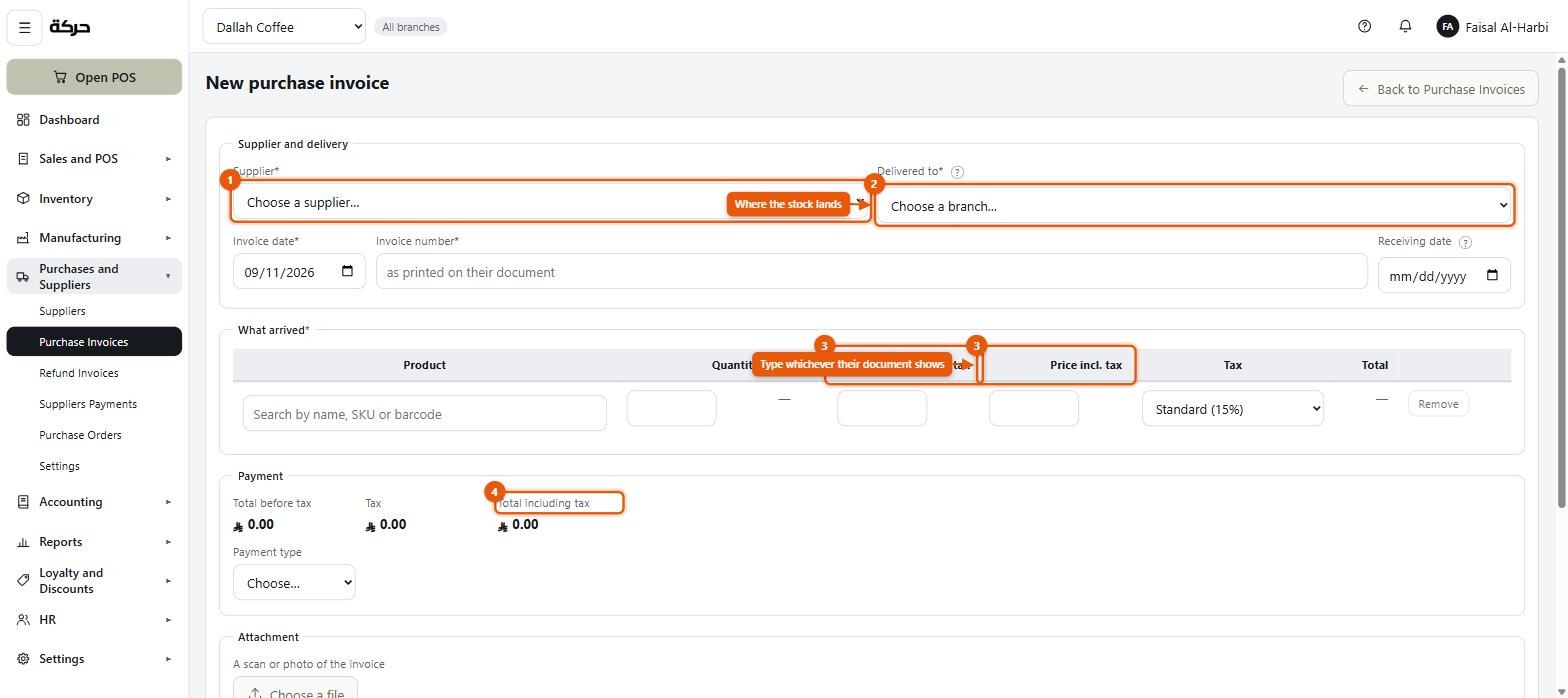
Entering one
- Choose a supplier.
- Their invoice number and date — as printed on their document.
- Delivered to — which branch the stock arrived at. This is what decides where the quantities land.
- Lines: product, quantity, unit cost, tax.
For each line you can type the price before VAT or including VAT, and the form shows both. Type whichever their document shows, so you are copying rather than calculating.
Attach a scan or photo of the invoice if you have one.
Worth knowing: While you are typing, the total is shown with the words as typed after it — for example SAR 1,150.00 as typed. The amounts settle when it is received. An entered invoice is a draft — nothing has moved yet.
Entered, then received
Two states, and the difference matters.
Entered means the document is recorded. No stock has moved and nothing has posted.
Received means the goods are on the shelf. This is the moment:
- stock quantities go up at the delivery branch,
- the cost of each product is updated,
- the invoice posts to the ledger — stock as an asset, VAT as recoverable input tax, and the supplier as a payable.
Whether receiving needs approval
Purchases and Suppliers → Settings carries this choice:
- Entering an invoice receives it — one step. Right for a small shop where the person entering is the person who unpacked the boxes.
- Receiving an invoice needs approval — two steps, and the second needs the Purchasing · Approve permission. Right where the office enters invoices and a manager confirms what actually arrived.
Careful: Changing this setting itself needs the Purchasing · Approve permission. The screen says so.
Correcting one
A received invoice can be put back to entered — the screen calls it Put it back to entered. Doing so reverses what it posted, so the books stay correct, and lets you fix the lines and receive it again.
That is possible only within the month it was received in. Once that month has passed, putting it back would change a month whose figures — and VAT return — are already settled, so it is refused: correct it with a refund invoice instead.
An invoice can also be cancelled: Nothing arrives and no stock changes. The invoice stays on the list as a record that it was entered and abandoned. Use this when a delivery never happened.
#Refund invoices — returning to a supplier
Purchases and Suppliers → Refund Invoices.
When you send goods back — damaged, wrong, over-delivered — this is the document. It is the mirror of a purchase invoice: stock goes down, and what you owe the supplier goes down with it.
Raise it against the original purchase invoice so the system knows what is being returned and at what cost.
#Supplier payments
Purchases and Suppliers → Suppliers Payments.
Recording that you paid a supplier, and which invoices the payment covers.
That allocation is the point. A payment of SAR 10,000 against a supplier with six outstanding invoices needs to know which ones it settles, or your list of what you owe becomes fiction.
The screen shows what is allocated and what is not — SAR 8,400 of SAR 10,000 allocated — and tells you what is left over.
Worth knowing: An unallocated remainder is not an error. A payment on account, ahead of an invoice, is a real thing. The screen simply shows you that it is sitting there.
#Purchases settings
Purchases and Suppliers → Settings has two blocks.
Receiving — the approval choice described above.
Printing — how your purchase documents look when you print them:
| Setting | Notes |
|---|---|
| Paper | Which size to print on |
| Print in colour | |
| Show the business unit's logo | |
| Show our own details | |
| Show the supplier's details | |
| Show tax on each line | |
| Print the supplier's document | Include the scan you attached |
| Leave room for signatures | |
| Note at the foot | Free text on every purchase document |
#Getting your opening stock in
This is the question every new subscriber asks, so here it is plainly.
If you have invoices for the stock you are holding, enter them as purchase invoices dated when they actually happened, and receive them. Your stock and your costs are then both right, and the books show what you paid.
If you do not, use the opening quantity on each product (section 9) together with an opening balance for the stock's value (section 6). The quantities are right, the total value is right, and you have not invented supplier invoices that never existed.
Careful: What you must not do is take stock in with no cost at all. The quantities will be right and every profit figure will be wrong, because cost of sales will be zero on everything you sell from that stock.
#What to do next
Section 19 covers what happens to stock once it is in: counting it, moving it between branches, and writing it off.